
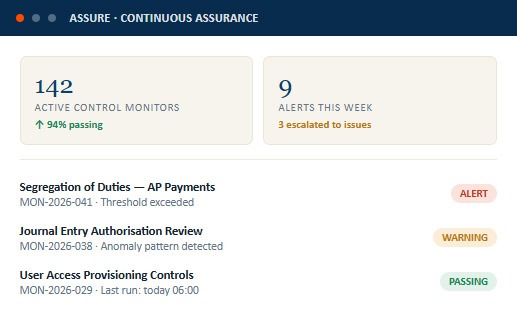
Across 9 control domains
Last 7-day monitoring cycle
28 escalated to formal issues
Earlier than next scheduled audit
Control monitors, automated alert workflows, and a live assurance posture dashboard — assurance that runs continuously, not just when an auditor is in the room.
Define control tests that run on a schedule against transaction data, system logs, and exception reports — flagging deviations from expected control behaviour without human intervention.
When a monitor flags an exception, an alert routes automatically to the control owner — with context, evidence, and a clear action path — before accumulating into an audit finding.
A real-time view of control health across all monitored domains — so management and the audit function know the assurance posture right now, not after the next engagement cycle.
Continuous assurance doesn't replace the internal audit function — it extends it. Falconry360 keeps controls monitored between engagements, so auditors spend time on judgement, not catch-up.
Define monitors for individual controls — specify the data source, test logic, threshold, frequency, and alert routing. Monitors are linked to the control library so each test is always traceable to a specific control objective.
Set green, amber, and red thresholds for each monitor. Exceptions above the amber threshold trigger an alert; above the red threshold, they can auto-escalate to a formal issue with owner assignment.
FalconryX analyses patterns across monitor results to surface anomalies that simple threshold rules would miss — identifying control drift, seasonal patterns, and unusual clustering before they become failures.
Every alert routes to the right control owner with a structured notification — what triggered it, what evidence the monitor captured, and what action is expected by when.
Every monitor run produces a result record — pass, warn, or fail — building a time-series history of control health that the audit function can use to risk-rank engagements and demonstrate improvement.
Aggregate monitor results into a live assurance posture score by control domain, process area, or entity — providing management and the audit committee with a continuous view of control effectiveness between audit cycles.
Three screens — the monitor library your assurance team configures, the alert workspace your control owners respond in, and the posture dashboard your CAE reviews between audit cycles.
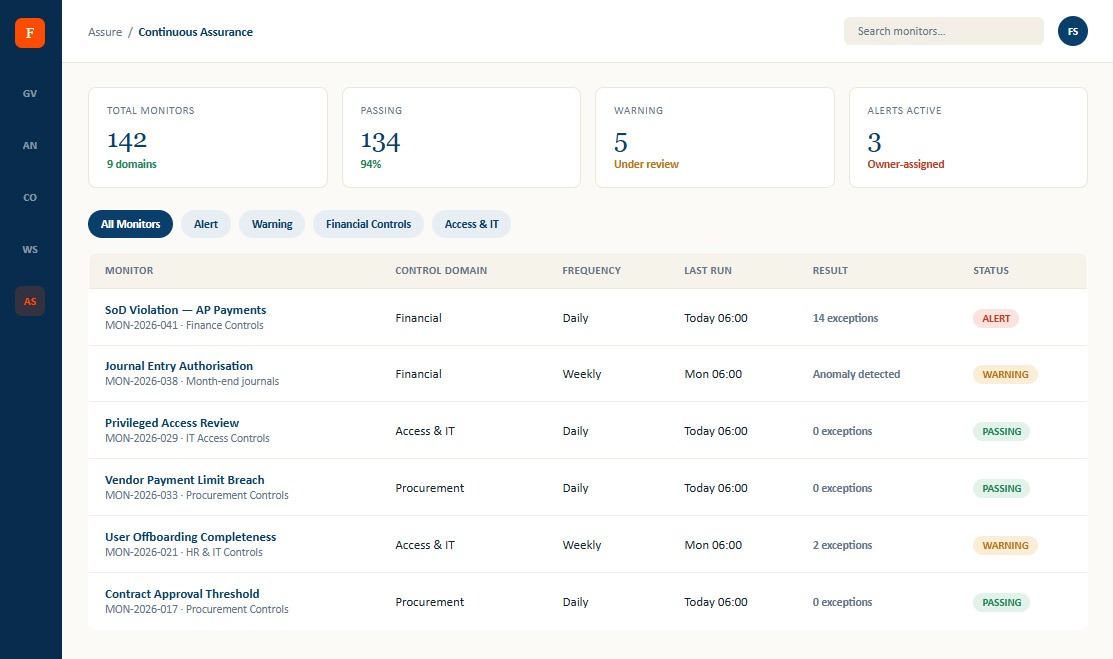
Every active monitor — control linked, data source configured, threshold set, frequency defined, and last result recorded — with a live pass/warn/fail status for each.
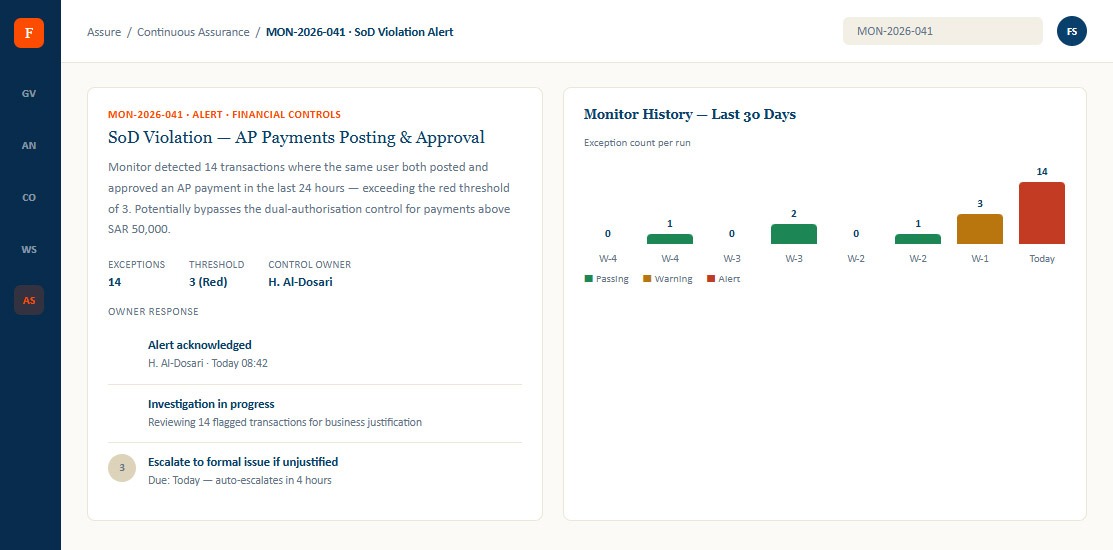
A structured alert record — what the monitor detected, the exception detail, control context, and the owner's response workflow — all in one place.
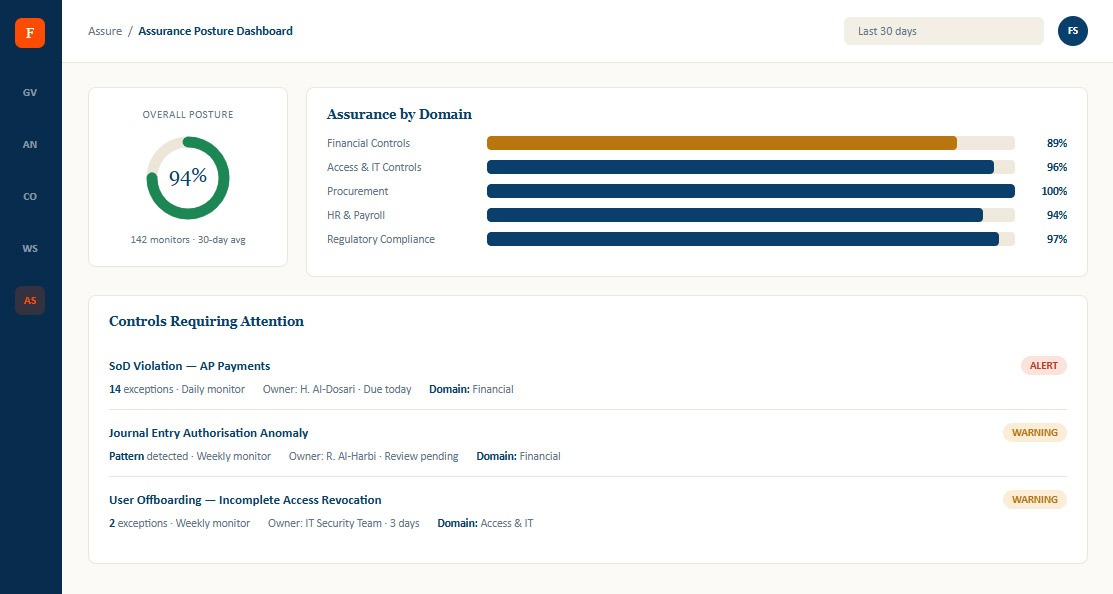
The view your CAE and audit committee use — overall assurance posture score, domain-level pass rates, trend over time, and a prioritised list of controls requiring attention.
Define the control being tested, the data source, the test logic, the pass/warn/alert thresholds, and how often the monitor runs.
The platform executes each monitor on its defined schedule — daily, weekly, or monthly — and records a result for every run.
Exceptions above threshold trigger an alert — routed to the control owner with the exception detail, context, and expected response timeline.
The control owner reviews the exceptions, documents their response, and either closes the alert or escalates it to a formal issue with a management action plan.
Every monitor run contributes to the rolling assurance posture score — giving management and the audit committee a live view of control health between audit cycles.
Monitors linked directly to the control library — so every automated test is traceable to a specific control objective and owner
Alert routing to control owners means exceptions are investigated before they become findings — reducing audit surprises and remediation backlogs
Time-series monitor history gives the audit function a risk-ranked signal about where to focus the next engagement cycle
FalconryX anomaly detection catches control drift that threshold rules alone would miss — flagging patterns, not just point-in-time exceptions
Assurance posture reporting gives the audit committee a live view of control health between audit cycles — not just an annual opinion
© 2026 Falconry360 . All rights reserved.